# Email Validator Config
The config feature allows you to customize various parameters to enhance or adjust the behavior of the **Email Validator** according to your company's needs. When a validation is executed, these parameters override the default configuration we have stored for any validation performed in **Truora**, ensuring that customers have all models up to date. For example:
{{}}
| Parameter | Client Config | Default Config | Used Config
(Client+Default) |
|---------------|:-------------:|:---------------:|:-------------------------------:|
|Allowed Retries| 1 | 2 | **1** |
|Timeout | 400 | 300 | **400** |
{{
}}
In this guide, you will learn how to update, retrieve, and delete a configuration for the **Email Validator**. We will use a single example throughout this guide to demonstrate the use of the **Update**, **Get**, and **Delete** Config requests, helping you understand their essential functions and responses.
## Email Validator Parameters
You can set the following parameters:
- ``timeout``: The amount of time, in seconds, that users will have to perform the validation before it times out. The default value is 300 seconds (5 minutes), with a maximum of 600 seconds (10 minutes) and a minimum of 1 second.
- ``allowed_retries``: The number of times the validation may be retried before failing. The default value value is 2 retries, with a maximum of 4 retries.
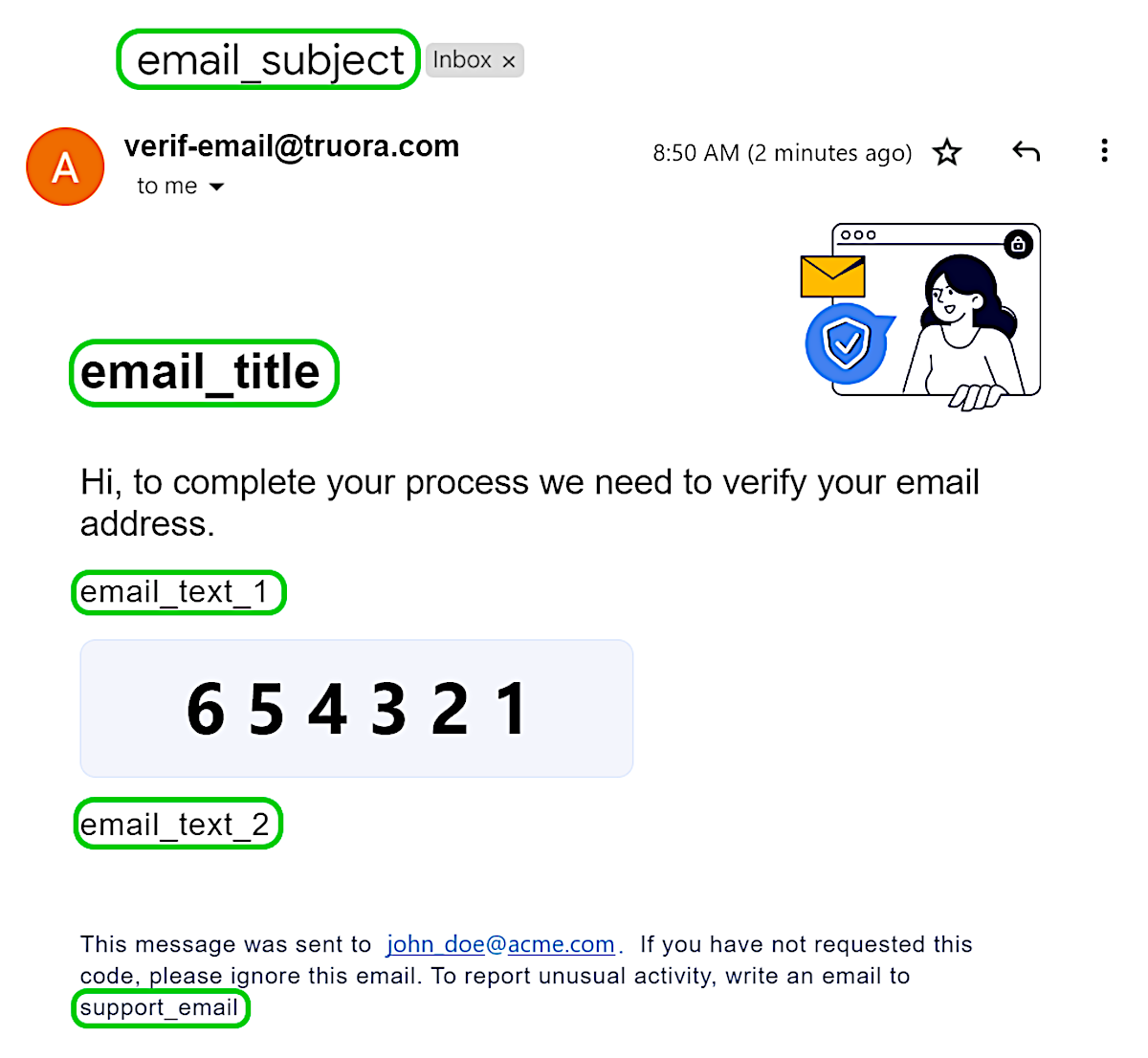
- ``email_subject`` [***Optional***]: Custom text for the email subject. *
- ``email_title`` [***Optional***]: Custom text for the email main title. *
- ``email_text_1`` [***Optional***]: Custom text appearing before the verification code. *
- ``email_text_2`` [***Optional***]: Custom text appearing after the verification code. *
- ``support_email`` [***Optional***]: Custom field for a support email address. *
***NOTES** ( parameters marked with asterisk \* ):
- The language of the email depends on the ``language`` parameter in the {{< newtab href="/guides/email_validation_api/" >}}Email Validation{{< /newtab >}} process.
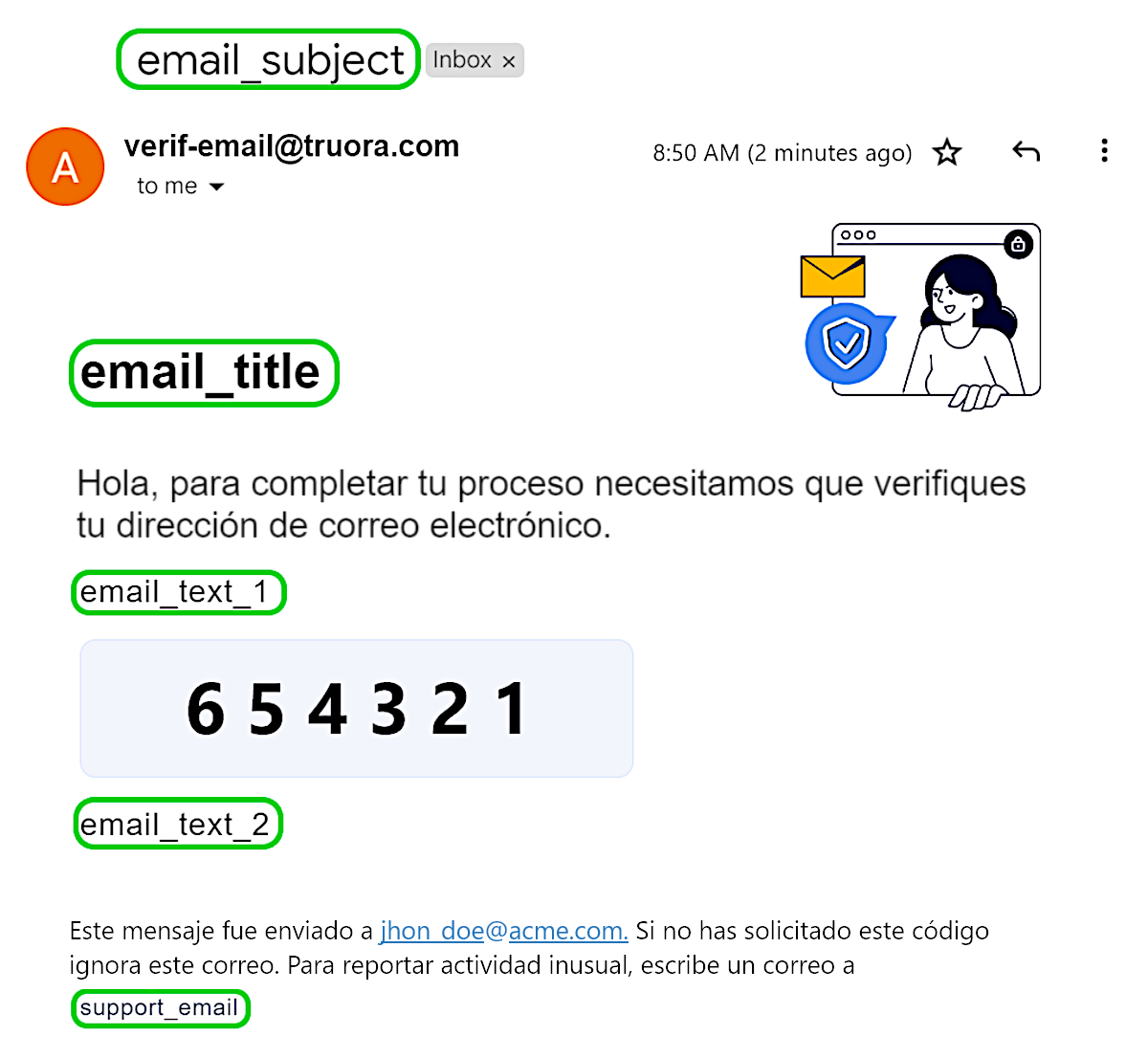
- Refer to the following images to see the location of each of these texts within the email sent to the user, for both the English (en) and Spanish (es) versions:
| Email fields (en) | Email fields (es) |
|:--------------------------------------------:|:---------------------------------------------:|
|{{ }}|{{
}}|{{ }}|
### Default Config
The **Email Validator** has a default configuration, which you can leave as is or adjust to better suit your industry or use case.
Below are the default values for this configuration:
{{
}}|
### Default Config
The **Email Validator** has a default configuration, which you can leave as is or adjust to better suit your industry or use case.
Below are the default values for this configuration:
{{}}
| Parameter | Default Value | Language |
|-----------------------|:-----------------------------------------------------------------------------------------------------:|:---------:|
| timeout | 300 | N/A |
| allowed_retries | 2 | N/A |
| email_subject * | "Su código de verificación de correo"
"Your email verification code" | es
en |
| email_title * | "Verificación de correo"
"Email verification" | es
en |
| email_text_1 * | "Tu código de verificación es:"
"Your verification code is:" | es
en |
| email_text_2 * | "Por seguridad, no compartir este código."
"For security reasons, please do not share this code." | es
en |
| support_email * | N/A | N/A |
{{
}}
***NOTES** ( parameters marked with asterisk \* ):
- The language of the default value depends on the ``language`` parameter in the {{< newtab href="/guides/email_validation_api/" >}}Email Validation{{< /newtab >}} process.
- This parameter will only appear in the JSON config response when customized. Otherwise, it will not be visible.
## Update Config - Email Validator
To Update the configuration for the Email Validator, follow these steps:
1. Create a ``PUT`` request to the endpoint ``https://api.validations.truora.com/v1/config``.
2. Set the **Headers**
- ``Truora-API-Key``: enter the value of your {{< newtab href="/guides/authentication/" >}}Truora API-key{{< /newtab >}}.
- ``Content-Type``: the value should be ``application/x-www-form-urlencoded``.
3. Set required values for the request body
- ``validator`` [***Required***]: Allowed: ``email-verification``. Validator to be configured.
- ``timeout``: The amount of time, in seconds, that users will have to perform the validation before it times out.
- ``allowed_retries``: The number of times the validation may be retried before failing.
- ``email_subject`` [***Optional***]: Custom text for the email subject.
- ``email_title`` [***Optional***]: Custom text for the email main title.
- ``email_text_1`` [***Optional***]: Custom text appearing before the verification code.
- ``email_text_2`` [***Optional***]: Custom text appearing after the verification code.
- ``support_email`` [***Optional***]: Custom field for a support email address.
For this guide's example we will start by setting the following parameters:
- ``timeout``: **600**
- ``allowed_retries``: **3**
- ``email_subject``: **ACME Verification code**
- ``support_email``: **``acme-support@acme.com``**
Sending the **Update Config** request with these parameters, the response should look similar to the following:
{{}}
{
"authenticate": {
"timeout": 300,
"allowed_retries": 2
},
"email-verification": {
"timeout": 600,
"allowed_retries": 3,
"email_subject": "ACME Verification code",
"support_email": "acme-support@acme.com"
},
"electronic-signature": {
"timeout": 900
},
"enterprise-data": {
"timeout": 300
},
"face-recognition": {
"timeout": 400,
"enrollment_timeout": 300,
"allowed_retries": 2,
"use_manual_review": true,
"threshold": 0.65,
"face_validation_config": {
"similarity": {
"threshold": 0.65
}
},
"retry_ttl": 300,
"include_face_search": false
}
}
{{}}
Among other details, you will identify the updated config:
- For ``email-verification`` the ``timeout`` is set to **600**, ``allowed_retries`` is set to **3**, ``email_subject`` is set to **ACME Verification code** and ``support_email`` is set to **``acme-support@acme.com``**.
## Get Config
The **Get Config** request allows you to fetch the current configuration state for all validators associated with your account. This request retrieves the configuration for the **Email Validator** as well as the configuration states for all other validators linked to your account.
- To obtain the current validators' configuration, send a **GET** request to the endpoint ``https://api.validations.truora.com/v1/config``.
In the case of our current example, at this point you should receive the same response as the previous step:
{{}}
{
"authenticate": {
"timeout": 300,
"allowed_retries": 2
},
"email-verification": {
"timeout": 600,
"allowed_retries": 3,
"email_subject": "ACME Verification code",
"support_email": "acme-support@acme.com"
},
"electronic-signature": {
"timeout": 900
},
"enterprise-data": {
"timeout": 300
},
"face-recognition": {
"timeout": 400,
"enrollment_timeout": 300,
"allowed_retries": 2,
"use_manual_review": true,
"threshold": 0.65,
"face_validation_config": {
"similarity": {
"threshold": 0.65
}
},
"retry_ttl": 300,
"include_face_search": false
}
}
{{}}
## Delete Config - Email Validator
The **Delete Config** request allows you to delete a validator's configuration or a specific parameter within the validator's configuration. Deleting the configuration resets its values back to their defaults.
- To delete a config, send a **DELETE** request to the endpoint ``https://api.validations.truora.com/v1/config`` with the following **Query Parameters**:
- ``validator`` [***Required***]: Name of the validation config to delete. Set this value to ``email-verification``.
- ``type`` [***Optional***]: Allowed: ``timeout``| ``allowed_retries`` | ``email_subject`` | ``email_title`` | ``email_text_1`` | ``email_text_2`` | ``support_email``. This specifies the configuration type to be reset. If provided, only the selected configuration will be reset. Otherwise, all configurations will be reset. *
***Note**: If you omit the ``type`` parameter when sending the request, all configurations associated with the validator will be deleted, reverting all values to their default settings.
### Deleting a specific config type
Following our example, we had updated the following configuration:
- For ``email-verification`` the ``timeout`` was set to **600**, ``allowed_retries`` was set to **3**, ``email_subject`` was set to **ACME Verification code** and ``support_email`` was set to **``acme-support@acme.com``**.
To reset the **timeout** to its default value (300 seconds), set the following **Query Parameters** :
- ``validator``: **email-verification**
- ``type``: **timeout**
Now send the **DELETE** request to the endpoint ``https://api.validations.truora.com/v1/config``. In the response, you should see that for ``email-verification`` the ``timeout`` has been reset to **300**, and all other parameters will remain unchanged: ``allowed_retries`` at **3**, ``email_subject`` as **ACME Verification code** and ``support_email`` as **``acme-support@acme.com``**:
{{}}
{
"authenticate": {
"timeout": 300,
"allowed_retries": 2
},
"email-verification": {
"timeout": 300,
"allowed_retries": 3,
"email_subject": "ACME Verification code",
"support_email": "acme-support@acme.com"
},
"electronic-signature": {
"timeout": 900
},
"enterprise-data": {
"timeout": 300
},
"face-recognition": {
"timeout": 400,
"enrollment_timeout": 300,
"allowed_retries": 2,
"use_manual_review": true,
"threshold": 0.65,
"face_validation_config": {
"similarity": {
"threshold": 0.65
}
},
"retry_ttl": 300,
"include_face_search": false
}
}
{{}}
### Deleting all configurations
Following our example, after deleting the ``timeout`` config, we have the following configuration states:
- For ``email-verification``, the ``timeout`` was reset to its default (**300**), ``allowed_retries`` is set to **3**, ``email_subject`` is set to **ACME Verification code** and ``support_email`` is set to **``acme-support@acme.com``**.
To reset all the configuration for the **Email Validator**, set the following **Query Parameters** :
- ``validator``: **email-verification**
- ``type``: Omit this parameter. Remember that if this parameter is omitted, all configurations will be reset to their default values.
Now send the **DELETE** request to the endpoint ``https://api.validations.truora.com/v1/config``:
{{}}
{
"authenticate": {
"timeout": 300,
"allowed_retries": 2
},
"email-verification": {
"timeout": 300,
"allowed_retries": 2,
},
"electronic-signature": {
"timeout": 900
},
"enterprise-data": {
"timeout": 300
},
"face-recognition": {
"timeout": 400,
"enrollment_timeout": 300,
"allowed_retries": 2,
"use_manual_review": true,
"threshold": 0.65,
"face_validation_config": {
"similarity": {
"threshold": 0.65
}
},
"retry_ttl": 300,
"include_face_search": false
}
}
{{}}
Finally, in this response you should recognize the following changes:
- For ``email-verification`` the ``timeout`` remains **300** (default), ``allowed_retries`` is reset to **2** (default), and both ``email_subject`` and ``support_email`` are not visible, which means they returned to their default values.