# Approval requests (Consent Gate)
The **Consent Gate** is a decoupled, human-in-the-loop approval flow built on top of the [CIBA flow](/truora-pass/ciba_flow/). Where plain CIBA asks a user to authorize a set of OAuth **scopes** behind a single `binding_message` line, the Consent Gate asks a user to review and approve a **rich prompt you compose** — markdown, tables, attachments, images, and an optional structured decision form — and returns their decision (plus any form data they submitted) to your backend. This is also what backs the [self-delivered WhatsApp link](/truora-pass/ciba_whatsapp_guide/#delivery-modes) mode, for when you'd rather deliver the approval link yourself than have Truora Pass send it.
Use it when a backend process needs a specific person to sign off on something before it proceeds: an AI agent about to run a production change, a payment above a threshold, a refund, or any "are you sure?" that needs more context than one line can carry.
## How it differs from the plain CIBA flow
| | [CIBA flow](/truora-pass/ciba_flow/) | Consent Gate (this guide) |
|---|---|---|
| What the user approves | A set of OAuth **scopes** | A rich prompt you compose (**`authorization_details`**) |
| What you get back | Tokens | The **decision** (+ submitted form data), and tokens |
| How you receive it | Poll `POST /v1/oauth2/token` | **Push** to your callback (approval requests are *not* redeemable at the token endpoint) |
| Extra content | `binding_message` (one short line) | Ordered typed **blocks** + an optional **answer form** |
## When to use it
- You want to deliver the approval link yourself — your own WhatsApp bot, in-app chat, email, SMS — instead of Truora Pass sending it. See [Delegate mode](#delegate-mode-delivering-the-approval-link-yourself) below.
- You need to collect a small structured answer from the reviewer alongside their decision, via a JSON Schema form. See [step 3](#3-build-the-approval-prompt).
- You're requesting approval for someone who **doesn't have a Truora Pass account yet**. See [Deferred binding](#deferred-binding-approving-for-someone-without-an-account-yet).
## Prerequisites
- Your application must have the CIBA grant, `urn:openid:params:grant-type:ciba` — see [Registering your application](/truora-pass/registering_your_application/).
- Register the `approval:read` scope on your application. It isn't added automatically to any request — you need it in step 4 to read the decision and form data.
- By default, Truora Pass delivers the approval link over WhatsApp to the reviewer's **verified phone**, so the reviewer needs an existing Truora Pass account whose email matches your `login_hint`. If you'd rather deliver the link yourself — recommended, since the default WhatsApp template can't carry your rich prompt content, only a link — the reviewer doesn't need an account yet either; see [Delegate mode](#delegate-mode-delivering-the-approval-link-yourself) and [Deferred binding](#deferred-binding-approving-for-someone-without-an-account-yet) below.
## 1. Configure token delivery (push)
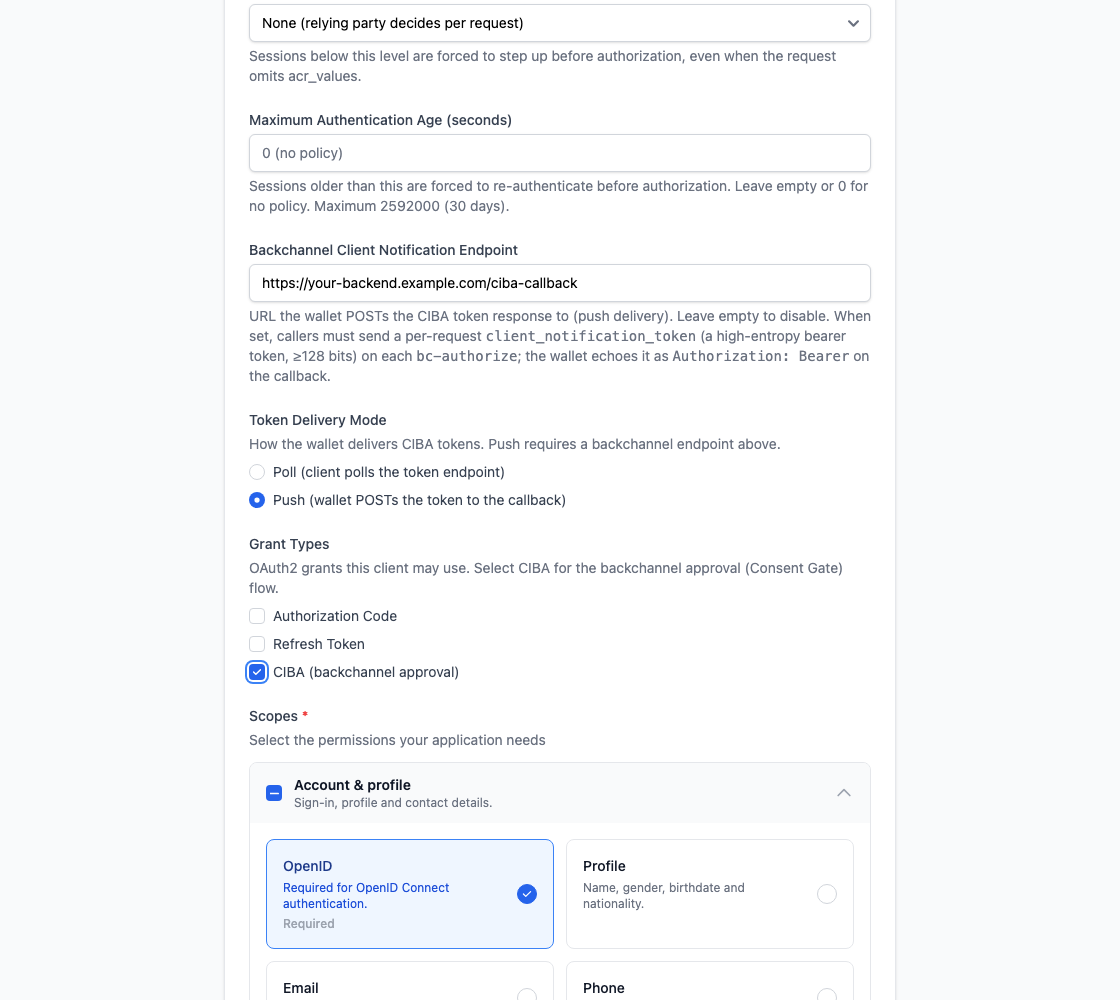
The Consent Gate returns its result to a **push callback**. Configure this once on your application in the [Truora Pass Dashboard](https://dashboard.pass.truora.com), on the application create/edit form (also documented in [Registering your application](/truora-pass/registering_your_application/#application-form-fields)):
- **Grant types** — enable **CIBA (backchannel approval)**.
- **Token Delivery Mode** (`backchannel_token_delivery_mode`) — set to **push**. (`poll` is the default and applies to the plain [CIBA flow](/truora-pass/ciba_flow/); a Consent Gate approval request is **not** redeemable at the token endpoint.)
- **Backchannel Client Notification Endpoint** (`backchannel_client_notification_endpoint`) — the HTTPS URL on your backend where Truora Pass POSTs the decision. Must be an absolute `https` URL; plain `http` is accepted only for loopback hosts (`localhost`, `127.0.0.1`, `::1`) during development.
{{}}
Both fields are self-serve — no need to contact Truora. Without a registered push endpoint, decisions still happen, but your application has no notification of the result and no token to read it with — see the [recovery note](#7-read-the-submitted-form-data) below. Register before relying on this flow in production.
**Note**: The **`client_notification_token`** is not configured on the application — you send a fresh one **per request** (see step 4). Truora Pass echoes it back as the bearer credential on the push callback, so you can authenticate that the callback is genuinely yours.
## 2. (Optional) Upload attachments
If your prompt references a file — a plan, a CSV, an image, a PDF — upload it first. Truora Pass issues a **presigned PUT** so the bytes go straight to storage and never traverse the Truora Pass API. Do this once per file, before building the prompt.
```bash
curl -X POST https://api.pass.truora.com/v1/oauth2/approval-attachments \
--data-urlencode "client_id=WLT_APP_your_client_id" \
--data-urlencode "client_secret=your_client_secret" \
--data-urlencode "login_hint=user@example.com" \
--data-urlencode "file_name=tfplan.txt" \
--data-urlencode "content_type=text/plain"
```
The response gives you an opaque `s3_key` (which you reference from a block) and a short-lived `upload_url`:
```json
{
"s3_key": "wallet-approval-docs////",
"name": "tfplan.txt",
"content_type": "text/plain",
"upload_url": "https://...presigned-put...",
"expires_in": 600
}
```
Then PUT the bytes to `upload_url`, with the same content type:
```bash
curl -X PUT "" \
-H "Content-Type: text/plain" \
--data-binary @tfplan.txt
```
| Parameter | Required | Description |
|---|---|---|
| `client_id` / `client_secret` | Yes | Your application credentials, sent **in the form body** (like `bc-authorize`) — this endpoint doesn't take a bearer token. |
| `login_hint` | Yes | The reviewer's **email**. Attachments are staged against this address, not a wallet account, specifically so you can upload before the reviewer has one — see [Deferred binding](#deferred-binding-approving-for-someone-without-an-account-yet). |
| `file_name` | Yes | The display filename. If it has an extension, it must match the declared `content_type` (e.g. `.pdf` for `application/pdf`); a filename with no extension is accepted as-is. |
| `content_type` | Yes | The MIME type. Allowed: `image/png`, `image/jpeg`, `image/gif`, `image/webp`, `application/pdf`, `text/plain`, `text/markdown`, `text/csv`, `application/json`. Active-content types (HTML, SVG) are refused. |
**Note**: Each file is capped at **10 MB**, and the `upload_url` expires in **10 minutes** — that's the URL's validity window, not the object's retention; don't rely on an `s3_key` remaining valid indefinitely, and reference it in an `authorization_details` block soon after uploading. When you start the request in step 4, Truora Pass re-reads each referenced object and **sniffs its real bytes** — a declared `content_type` that doesn't match the actual content is rejected.
| Error | HTTP status | When |
|---|---|---|
| `invalid_request` | 400 | Missing `file_name`/`content_type`, disallowed `content_type`, or extension/content-type mismatch. |
| `unknown_user_id` | 400 | `login_hint` isn't a valid email. |
| `invalid_client` | 401 | Wrong `client_id`/`client_secret`. |
| `unauthorized_client` | 400 | Your application isn't allowed to use the CIBA grant. |
## 3. Build the approval prompt
The prompt travels as an RFC 9396 **`authorization_details`** array with a single entry of type `urn:truora:wallet:approval`. It has a `title`, an ordered list of typed **`blocks`**, and an optional decision form (`answer_form_schema` + `answer_form_ui_schema`, [JSONForms](https://jsonforms.io/)).
```json
[
{
"type": "urn:truora:wallet:approval",
"title": "Production infrastructure change — approval required",
"blocks": [
{ "type": "markdown", "text": "# Production change\nThe **Refund Agent** wants to run `terraform apply` against **production**." },
{ "type": "markdown", "text": "| Field | Value |\n|---|---|\n| Environment | production |\n| Risk | High |" },
{ "type": "divider" },
{ "type": "markdown", "text": "## Terraform plan" },
{ "type": "attachment", "s3_key": "wallet-approval-docs/.../tfplan" },
{ "type": "markdown", "text": "## Target architecture" },
{ "type": "image", "s3_key": "wallet-approval-docs/.../diagram", "alt": "Target architecture" },
{ "type": "file", "s3_key": "wallet-approval-docs/.../audit", "label": "Download audit.json" }
],
"answer_form_schema": {
"type": "object",
"required": ["justification", "rollbackTested"],
"properties": {
"justification": { "type": "string", "minLength": 10, "title": "Justification" },
"rollbackTested": { "type": "boolean", "title": "I confirm the rollback plan was tested" }
}
},
"answer_form_ui_schema": {
"type": "VerticalLayout",
"elements": [
{ "type": "Control", "scope": "#/properties/justification", "options": { "multi": true } },
{ "type": "Control", "scope": "#/properties/rollbackTested" }
]
}
}
]
```
| Field | Type | Notes |
|---|---|---|
| `type` | string | Must be exactly `urn:truora:wallet:approval`. |
| `title` | string | Optional; trimmed; shown at the top of the approval screen. |
| `blocks` | array | Ordered list of typed content blocks — see below. |
| `answer_form_schema` | JSON Schema | Optional — see [Collecting structured answers](#collecting-structured-answers-optional) below. |
| `answer_form_ui_schema` | JSONForms UI schema | Optional; if provided, `answer_form_schema` must be present too. |
### Block types
| Type | Required fields | Optional fields | Renders as | Limit |
|---|---|---|---|---|
| `markdown` | `text` (non-blank) | — | Formatted text — headings, lists, tables, inline code. | 16 KB per block |
| `attachment` | `s3_key` | `name` | The file's content shown **inline** if small enough (rendered as markdown for `text/markdown`, plain text otherwise) — see step 5. | — |
| `image` | `s3_key` | `alt`, `name` | An inline image. | — |
| `file` | `s3_key` | `label`, `name` | A **download** link. | — |
| `divider` | — | — | A horizontal rule. | visual separator only |
`attachment`/`image`/`file` blocks reference an object staged with the endpoint from step 2 — `s3_key` is the value it returned; `name` overrides the display name.
Rules across the whole prompt:
- Up to **50 blocks** per prompt.
- The combined `text` across all `markdown` blocks is capped at **64 KB**.
- The whole `authorization_details` value is capped at **64 KB**.
- Any other `type` value, or a block missing its required field, is rejected with `invalid_request` — "approval blocks are invalid".
### Collecting structured answers (optional)
Ask the reviewer to fill out a small form alongside their decision by supplying `answer_form_schema` (a JSON Schema) and, optionally, `answer_form_ui_schema` (a JSONForms UI schema controlling how it renders). Each is capped at **32 KB**. The submitted answers come back in the `data` field when you [read the outcome](#7-read-the-submitted-form-data) in step 7.
Errors from this step, and from the block/attachment rules above, use the standard OAuth 2.0 error envelope (`{"error": "...", "error_description": "..."}`):
| Error | HTTP status | When |
|---|---|---|
| `invalid_request` | 400 | `authorization_details` exceeds 64 KB or isn't a valid JSON array; a block is invalid (unknown type, missing required field, or over its size limit); an attachment referenced by a block is missing, too large, or its content doesn't match its declared type; or either form schema exceeds 32 KB, `answer_form_schema` isn't a valid JSON Schema, or `answer_form_ui_schema` doesn't resolve against it (e.g. it references a field the schema doesn't define, or the schema requires a field the UI schema never asks for). |
| `invalid_authorization_details` | 400 | More than one `urn:truora:wallet:approval` entry was included, or none of the entries matched a known type. |
## 4. Start the request
POST the prompt to the backchannel endpoint, **form-encoded** — `authorization_details` as a JSON string, and a fresh `client_notification_token`:
```bash
curl -X POST https://api.pass.truora.com/v1/oauth2/bc-authorize \
--data-urlencode "client_id=WLT_APP_your_client_id" \
--data-urlencode "client_secret=your_client_secret" \
--data-urlencode "login_hint=user@example.com" \
--data-urlencode "scope=openid approval:read" \
--data-urlencode "client_notification_token=$(openssl rand -hex 32)" \
--data-urlencode 'authorization_details=[{"type":"urn:truora:wallet:approval","title":"...","blocks":[...]}]'
```
| Parameter | Required | Description |
|---|---|---|
| `client_id` / `client_secret` | Yes | Your application credentials. |
| `login_hint` | Yes | The reviewer's **email address** (must contain `@`). |
| `authorization_details` | Yes | The JSON array from step 3. Exactly one `urn:truora:wallet:approval` entry. |
| `scope` | Optional | Unlike plain CIBA, `scope` isn't required on a rich request. Include `approval:read` if you want the pushed access token to be able to read the outcome — see [Scopes alongside the prompt](#scopes-alongside-the-prompt) below and step 7. |
| `client_notification_token` | Yes | A per-request secret you generate. **Required** because your application has a registered callback endpoint. Truora Pass echoes it back as the bearer credential on the push callback, so you can authenticate it. RFC 6750 token68 grammar, up to 1024 characters. |
| `requested_expiry` | No | How long the request stays approvable, in seconds. Default **300 seconds** (5 minutes) if omitted, capped at **900 seconds** (15 minutes). Contact Truora if a longer window would help — for example a team-approval workflow that should stay open for a working day. |
| `acr_values` | No | Advanced: requested authentication context (step-up). |
On success:
```json
{
"auth_req_id": "",
"expires_in": 900,
"interval": 5
}
```
**Note**: `interval` is always present in the response, but polling `auth_req_id` at the token endpoint for an approval request always fails — see [step 7](#7-read-the-submitted-form-data). Ignore `interval` for this flow; it only applies to plain CIBA polling.
Errors use the OAuth 2.0 envelope `{"error": "...", "error_description": "..."}`:
| Error | Meaning |
|---|---|
| `invalid_authorization_details` | Missing/unknown `type`, or more than one `urn:truora:wallet:approval` entry. |
| `invalid_request` | A block or form schema is invalid, an attachment is missing/too large/mismatched, or `client_notification_token` is missing or malformed. |
| `unknown_user_id` | No Truora Pass user resolves from the `login_hint` (not applicable in [delegate mode with deferred binding](#deferred-binding-approving-for-someone-without-an-account-yet)). |
| `invalid_client` | Wrong `client_id` / `client_secret` (HTTP 401). |
| `unauthorized_client` | Your application is not allowed to use the CIBA grant. |
### Scopes alongside the prompt
`scope` can be combined with `authorization_details`:
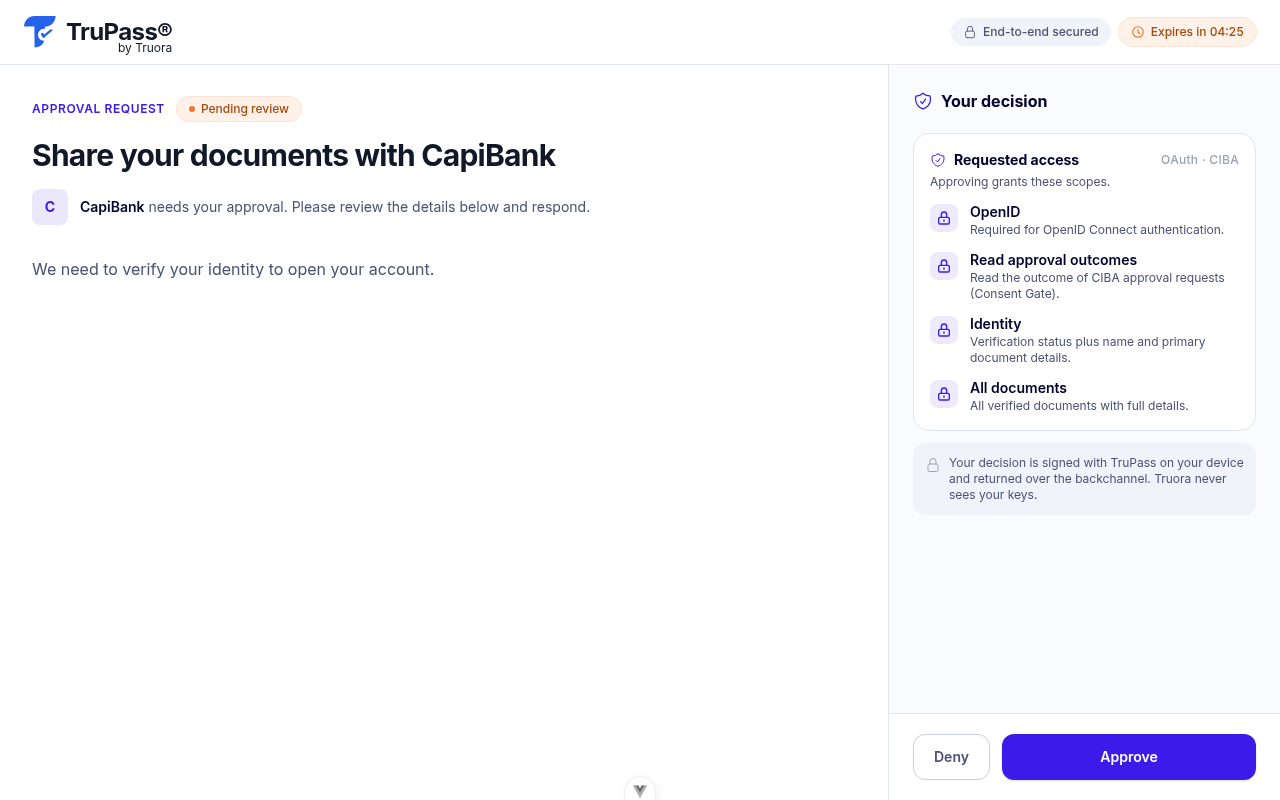
- If you include `scope`, the requested scopes are shown to the reviewer as a "Requested access" card, in addition to your `title`/`blocks` prompt — see step 5.
- `binding_message` has no effect in this flow — `title` and `blocks` fully replace it as the "what am I approving" surface. Sending it is simply ignored.
- The sensitive-scope rule that makes `binding_message` mandatory on plain CIBA (for `documents`, `background`, etc. — see the [Scopes reference](/truora-pass/scopes_reference/)) does **not** apply here; your prompt is trusted to convey what's being requested.
- If the request is approved and your application is registered for push delivery, those scopes become the actual scopes on the access token you're pushed — exactly as in plain CIBA.
## 5. The reviewer approves on their device
Truora Pass delivers a WhatsApp message to the reviewer's verified phone with a link to the approval screen (unless you're [delivering the link yourself](#delegate-mode-delivering-the-approval-link-yourself)). Opening it doesn't require the reviewer to already be signed in — they're prompted to sign in (or sign up, for a [deferred](#deferred-binding-approving-for-someone-without-an-account-yet) request) inline, without leaving the page, and the prompt loads once they do.
{{}}
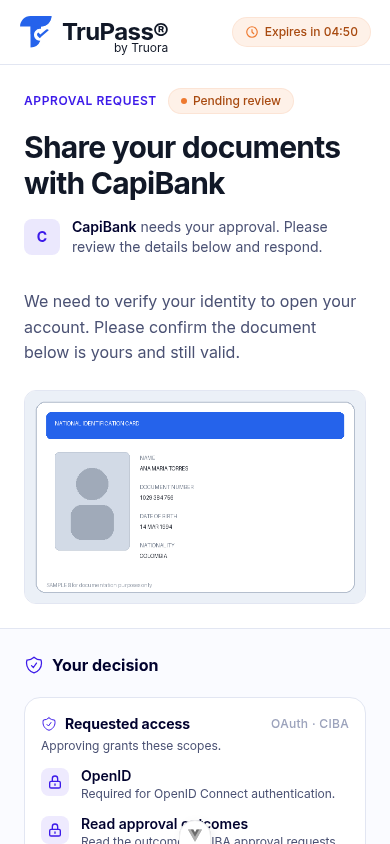
Here is what a prompt with a `markdown` block and an `image` block looks like on the reviewer's phone:
{{}}
Each block renders as:
| Block | What the reviewer sees |
|---|---|
| `markdown` | Rendered, formatted text. |
| `attachment` | Read inline (rendered as markdown for `text/markdown`, or as plain text otherwise) if the object is small enough; larger objects are automatically presented as a downloadable `file` instead. |
| `image` | Displayed inline. |
| `file` | A labeled row the reviewer opens or downloads via a temporary link. |
| `divider` | A visual separator. |
If `scope` was included in step 4, a "Requested access" card lists it alongside the prompt:
{{}}
If you supplied `answer_form_schema`, the reviewer also fills in the decision form. **Approve is disabled until the required fields are valid.** The reviewer then approves or denies — a decision is **final**: there's no undo or re-decide, and the approval link itself is single-use (viewing it doesn't consume it, but deciding does).
| Situation | What the reviewer/your integration sees | HTTP status |
|---|---|---|
| Link already used or expired | "This approval link has expired or already been used" | 401 `invalid_token` |
| The request behind the link expired before a decision | "The request has expired" | 410 `request_expired` |
| Already approved or denied | "This request is no longer pending" | 409 `already_decided` |
Once the reviewer decides, they see a confirmation and your backend receives the result on your callback.
{{}}
## 6. Receive the decision on your callback
At decision time Truora Pass POSTs a JSON body to your `backchannel_client_notification_endpoint`, authenticated with your per-request token as a bearer:
```text
POST /your-callback
Authorization: Bearer
Content-Type: application/json
```
On **approve**, the body is the auth request id plus a full token response:
```json
{
"auth_req_id": "",
"access_token": "",
"token_type": "Bearer",
"expires_in": 3600,
"scope": "openid approval:read",
"id_token": ""
}
```
On **deny**, the body carries the error instead:
```json
{ "auth_req_id": "", "error": "access_denied" }
```
**Note**: The CIBA flow does not issue a `refresh_token`. When the delivered access token expires, start a new request if you still need access.
## 7. Read the submitted form data
The push body carries the decision and the tokens, but not the reviewer's **form answers** or a way to verify what they actually saw — a token response has no room for either. Read them from the outcome endpoint:
```bash
curl "https://api.pass.truora.com/v1/oauth2/approval-outcome?auth_req_id=" \
-H "Authorization: Bearer "
```
```json
{
"decision": "approved",
"data": { "justification": "promoting after a successful staging soak", "rollbackTested": true },
"prompt_checksum": ""
}
```
- `decision` — `pending`, `approved`, `denied`, or `expired`.
- `data` — the reviewer's form answers, already validated by Truora Pass against your `answer_form_schema`; only populated when `decision` is `approved` and you supplied a schema.
- `prompt_checksum` — a digest over the exact prompt shown at decision time: the title, every block (including a content fingerprint of any attachment/image/file, not the raw bytes), and the form schemas. Empty while pending.
- Attachments themselves are **not** echoed here — you already have them, since you supplied the `s3_key` values.
**Which tokens work here:** any valid access token issued to **your application** that carries the `approval:read` scope — not only the one pushed for this specific request. `approval:read` is never added automatically; it only ends up on a token if you asked for it in `scope` on `bc-authorize` (step 4). Because the endpoint accepts any token your application holds with that scope, this has two practical consequences:
- **You can observe `pending`**: with a previously obtained `approval:read` token you can read a request's outcome before the reviewer decides.
- **A missed push is recoverable**: the approval record persists after the decision (reading it doesn't consume it, and it can be read repeatedly) — so if your callback endpoint was down when Truora Pass pushed, read the outcome here with any valid `approval:read` token you hold. If you hold none for this application, the pushed token was your only credential and the outcome is unreadable; monitor your callback endpoint's availability.
A client may only read the outcome of **its own** approvals.
| Error | HTTP status | When |
|---|---|---|
| Missing or invalid Bearer token | 401 | The `Authorization` header is absent, malformed, or the token is invalid or expired. |
| `insufficient_scope` | 403 | The token doesn't carry `approval:read`. |
| `forbidden` | 403 | The request belongs to a different client than the one presenting the token. |
| `not_found` | 404 | `auth_req_id` doesn't exist, or exists but isn't an approval request (the two cases aren't distinguishable). |
| `invalid_request` | 400 | `auth_req_id` is missing. |
## 8. Validate the result
Before acting on a decision, confirm all of the following:
- **Authenticate the callback.** Check the incoming `Authorization: Bearer` value equals the `client_notification_token` you sent for that `auth_req_id`. Reject anything else — this is what proves the callback is genuinely from Truora Pass. There is no separate cryptographic signature on the callback body; the bearer match plus the `prompt_checksum` (step 7) is the integrity guarantee.
- **Match the request.** Confirm the `auth_req_id` in the body is one you started and are still waiting on.
- **Check the decision.** Only proceed on `decision: "approved"`; treat `access_denied` / `expired` as a stop.
- **Record the `prompt_checksum`.** Store it with your action as proof of *what* the reviewer approved (consent integrity).
- **Treat tokens as opaque.** Do not decode or verify the `access_token` / `id_token` yourself — read the user's identity from [`GET /v1/oauth2/userinfo`](/truora-pass/userinfo_and_claims/) with the access token.
## Delegate mode: delivering the approval link yourself
**Delegate mode is the recommended way to deliver approval requests.** Without it, Truora Pass falls back to the same WhatsApp delivery as [plain CIBA](/truora-pass/ciba_whatsapp_guide/) — but that message template is built for plain CIBA requests, so for an approval request it carries only your application's name, the expiry, and the link, without a personalized greeting or description line. Since your rich prompt (title and blocks) is what gives the reviewer context, deliver the link through your own channel — your WhatsApp conversation, your app, your agent desktop — where you control the framing. Set `delegate_notification_to_client=true` on the `bc-authorize` request to take over delivery:
```bash
curl -X POST https://api.pass.truora.com/v1/oauth2/bc-authorize \
--data-urlencode "client_id=WLT_APP_your_client_id" \
--data-urlencode "client_secret=your_client_secret" \
--data-urlencode "login_hint=ana@example.com" \
--data-urlencode 'authorization_details=[{"type":"urn:truora:wallet:approval","title":"Share your documents with CapiBank","blocks":[{"type":"markdown","text":"We need to verify your identity to open your account."}]}]' \
--data-urlencode "delegate_notification_to_client=true"
```
```json
{
"auth_req_id": "",
"expires_in": 300,
"interval": 5,
"approval_url": ""
}
```
- Truora Pass does not send anything — you're responsible for getting `approval_url` to the reviewer (your own WhatsApp bot conversation, in-app chat, email, SMS, etc.).
- The reviewer's phone doesn't need to be verified for this mode — you're the one delivering the link, over whatever channel you choose.
- This parameter has no effect on plain, scope-only CIBA requests (ones without `authorization_details`) — it's only read on the rich approval-request path documented on this page.
### Deferred binding: approving for someone without an account yet
In delegate mode, `login_hint` doesn't need to resolve to an existing Truora Pass account. If no account matches, the request is created without one attached to it; the **first person to sign in with a verified email matching your `login_hint`** — including signing up on the spot — claims it. From then on it behaves exactly like a request created against an existing account.
If you're staging attachments (step 2) for a not-yet-registered recipient, use the same email as `login_hint` on both `approval-attachments` and `bc-authorize` — attachments are staged per email precisely to support this.
## Related
- [CIBA flow](/truora-pass/ciba_flow/) — the plain, scope-based backchannel flow (poll-based).
- [CIBA over WhatsApp — implementation guide](/truora-pass/ciba_whatsapp_guide/) — the `binding_message`-only flow this feature extends, including the default Truora-delivered WhatsApp path.
- [Scopes reference](/truora-pass/scopes_reference/) — the full scope catalog, including `approval:read`.
- [Registering your application](/truora-pass/registering_your_application/) — enabling the CIBA grant and configuring push delivery.
- [UserInfo and claims](/truora-pass/userinfo_and_claims/) — reading identity with the delivered access token.
 }}
Both fields are self-serve — no need to contact Truora. Without a registered push endpoint, decisions still happen, but your application has no notification of the result and no token to read it with — see the [recovery note](#7-read-the-submitted-form-data) below. Register before relying on this flow in production.
**Note**: The **`client_notification_token`** is not configured on the application — you send a fresh one **per request** (see step 4). Truora Pass echoes it back as the bearer credential on the push callback, so you can authenticate that the callback is genuinely yours.
## 2. (Optional) Upload attachments
If your prompt references a file — a plan, a CSV, an image, a PDF — upload it first. Truora Pass issues a **presigned PUT** so the bytes go straight to storage and never traverse the Truora Pass API. Do this once per file, before building the prompt.
```bash
curl -X POST https://api.pass.truora.com/v1/oauth2/approval-attachments \
--data-urlencode "client_id=WLT_APP_your_client_id" \
--data-urlencode "client_secret=your_client_secret" \
--data-urlencode "login_hint=user@example.com" \
--data-urlencode "file_name=tfplan.txt" \
--data-urlencode "content_type=text/plain"
```
The response gives you an opaque `s3_key` (which you reference from a block) and a short-lived `upload_url`:
```json
{
"s3_key": "wallet-approval-docs/
}}
Both fields are self-serve — no need to contact Truora. Without a registered push endpoint, decisions still happen, but your application has no notification of the result and no token to read it with — see the [recovery note](#7-read-the-submitted-form-data) below. Register before relying on this flow in production.
**Note**: The **`client_notification_token`** is not configured on the application — you send a fresh one **per request** (see step 4). Truora Pass echoes it back as the bearer credential on the push callback, so you can authenticate that the callback is genuinely yours.
## 2. (Optional) Upload attachments
If your prompt references a file — a plan, a CSV, an image, a PDF — upload it first. Truora Pass issues a **presigned PUT** so the bytes go straight to storage and never traverse the Truora Pass API. Do this once per file, before building the prompt.
```bash
curl -X POST https://api.pass.truora.com/v1/oauth2/approval-attachments \
--data-urlencode "client_id=WLT_APP_your_client_id" \
--data-urlencode "client_secret=your_client_secret" \
--data-urlencode "login_hint=user@example.com" \
--data-urlencode "file_name=tfplan.txt" \
--data-urlencode "content_type=text/plain"
```
The response gives you an opaque `s3_key` (which you reference from a block) and a short-lived `upload_url`:
```json
{
"s3_key": "wallet-approval-docs/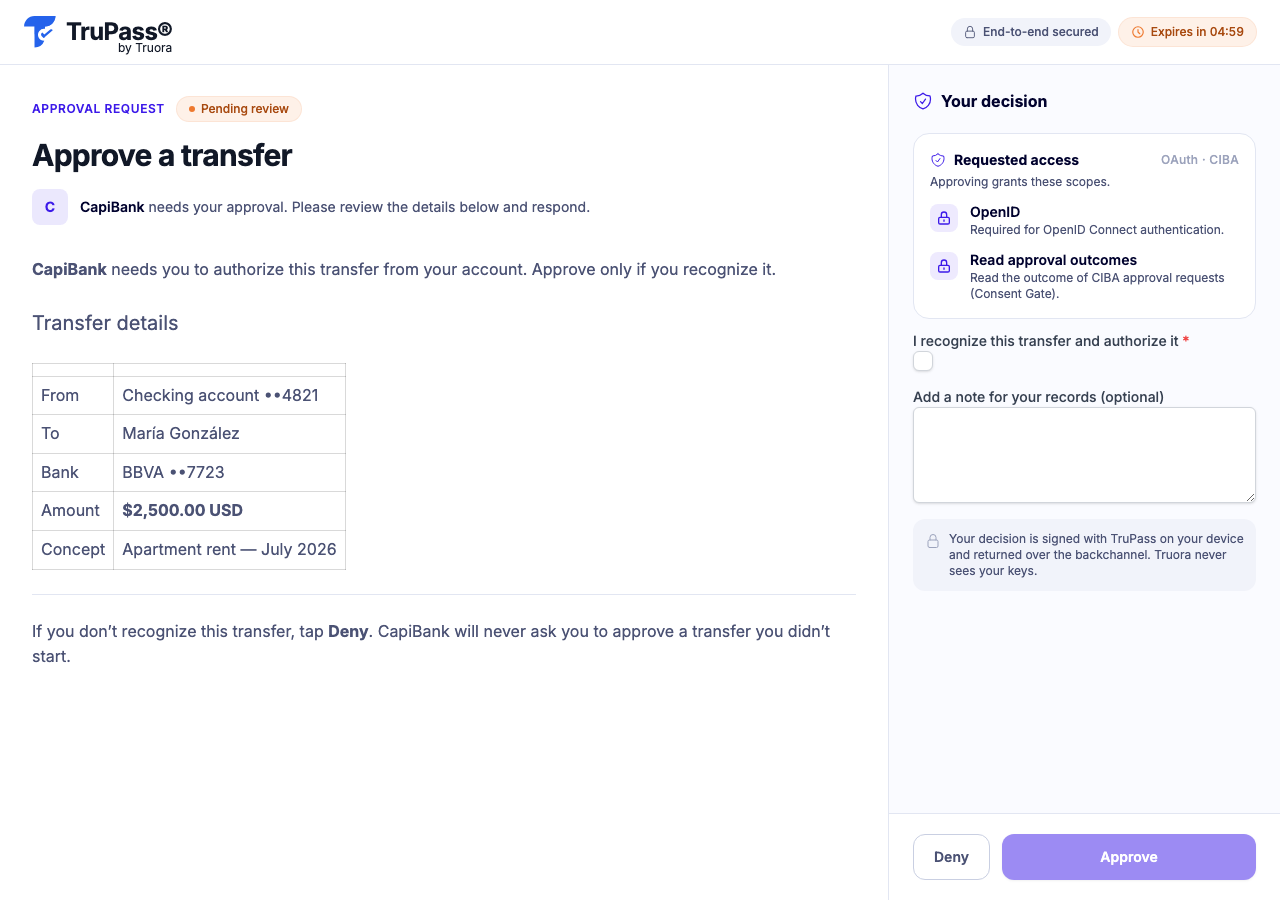 }}
Here is what a prompt with a `markdown` block and an `image` block looks like on the reviewer's phone:
{{
}}
Here is what a prompt with a `markdown` block and an `image` block looks like on the reviewer's phone:
{{ }}
Each block renders as:
| Block | What the reviewer sees |
|---|---|
| `markdown` | Rendered, formatted text. |
| `attachment` | Read inline (rendered as markdown for `text/markdown`, or as plain text otherwise) if the object is small enough; larger objects are automatically presented as a downloadable `file` instead. |
| `image` | Displayed inline. |
| `file` | A labeled row the reviewer opens or downloads via a temporary link. |
| `divider` | A visual separator. |
If `scope` was included in step 4, a "Requested access" card lists it alongside the prompt:
{{
}}
Each block renders as:
| Block | What the reviewer sees |
|---|---|
| `markdown` | Rendered, formatted text. |
| `attachment` | Read inline (rendered as markdown for `text/markdown`, or as plain text otherwise) if the object is small enough; larger objects are automatically presented as a downloadable `file` instead. |
| `image` | Displayed inline. |
| `file` | A labeled row the reviewer opens or downloads via a temporary link. |
| `divider` | A visual separator. |
If `scope` was included in step 4, a "Requested access" card lists it alongside the prompt:
{{ }}
If you supplied `answer_form_schema`, the reviewer also fills in the decision form. **Approve is disabled until the required fields are valid.** The reviewer then approves or denies — a decision is **final**: there's no undo or re-decide, and the approval link itself is single-use (viewing it doesn't consume it, but deciding does).
| Situation | What the reviewer/your integration sees | HTTP status |
|---|---|---|
| Link already used or expired | "This approval link has expired or already been used" | 401 `invalid_token` |
| The request behind the link expired before a decision | "The request has expired" | 410 `request_expired` |
| Already approved or denied | "This request is no longer pending" | 409 `already_decided` |
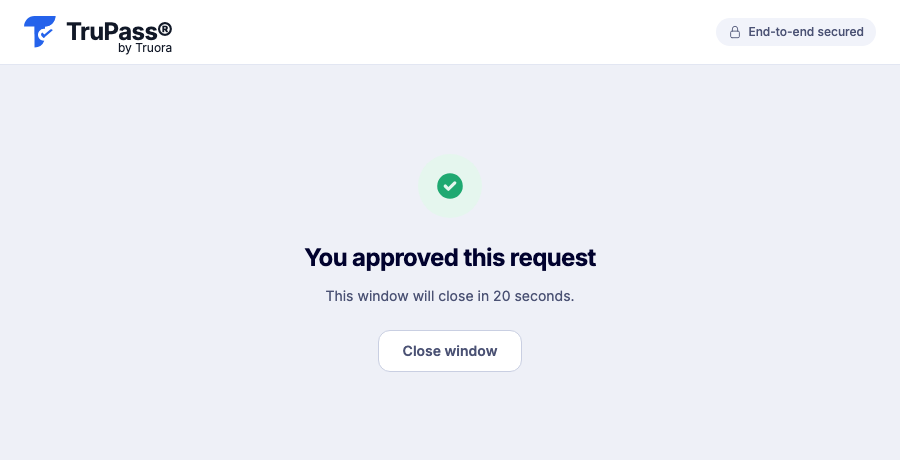
Once the reviewer decides, they see a confirmation and your backend receives the result on your callback.
{{
}}
If you supplied `answer_form_schema`, the reviewer also fills in the decision form. **Approve is disabled until the required fields are valid.** The reviewer then approves or denies — a decision is **final**: there's no undo or re-decide, and the approval link itself is single-use (viewing it doesn't consume it, but deciding does).
| Situation | What the reviewer/your integration sees | HTTP status |
|---|---|---|
| Link already used or expired | "This approval link has expired or already been used" | 401 `invalid_token` |
| The request behind the link expired before a decision | "The request has expired" | 410 `request_expired` |
| Already approved or denied | "This request is no longer pending" | 409 `already_decided` |
Once the reviewer decides, they see a confirmation and your backend receives the result on your callback.
{{ }}
## 6. Receive the decision on your callback
At decision time Truora Pass POSTs a JSON body to your `backchannel_client_notification_endpoint`, authenticated with your per-request token as a bearer:
```text
POST /your-callback
Authorization: Bearer
}}
## 6. Receive the decision on your callback
At decision time Truora Pass POSTs a JSON body to your `backchannel_client_notification_endpoint`, authenticated with your per-request token as a bearer:
```text
POST /your-callback
Authorization: Bearer