


🧭 Navigating Roles and Permissions
This guide walks through how to use the Roles tab in Members and Roles: list roles, create new roles, configure permissions by product, and edit role details.
To manage roles and permissions from the dashboard, your account must include the
truora.rolespermission — request it during onboarding or from your Support team if you need it.
For how permissions, roles, and members relate in Truora — including default roles and Master Client Permissions — see Understanding Account Access and Permissions.
📂 Open Members and Roles
- Go to Truora Dashboard and sign in.
- If you have multiple accounts, select the account you want.
- In the sidebar, open Members and Roles.
📋 Roles tab — list roles
Select the Roles tab at the top. Truora lists every role defined for that account.
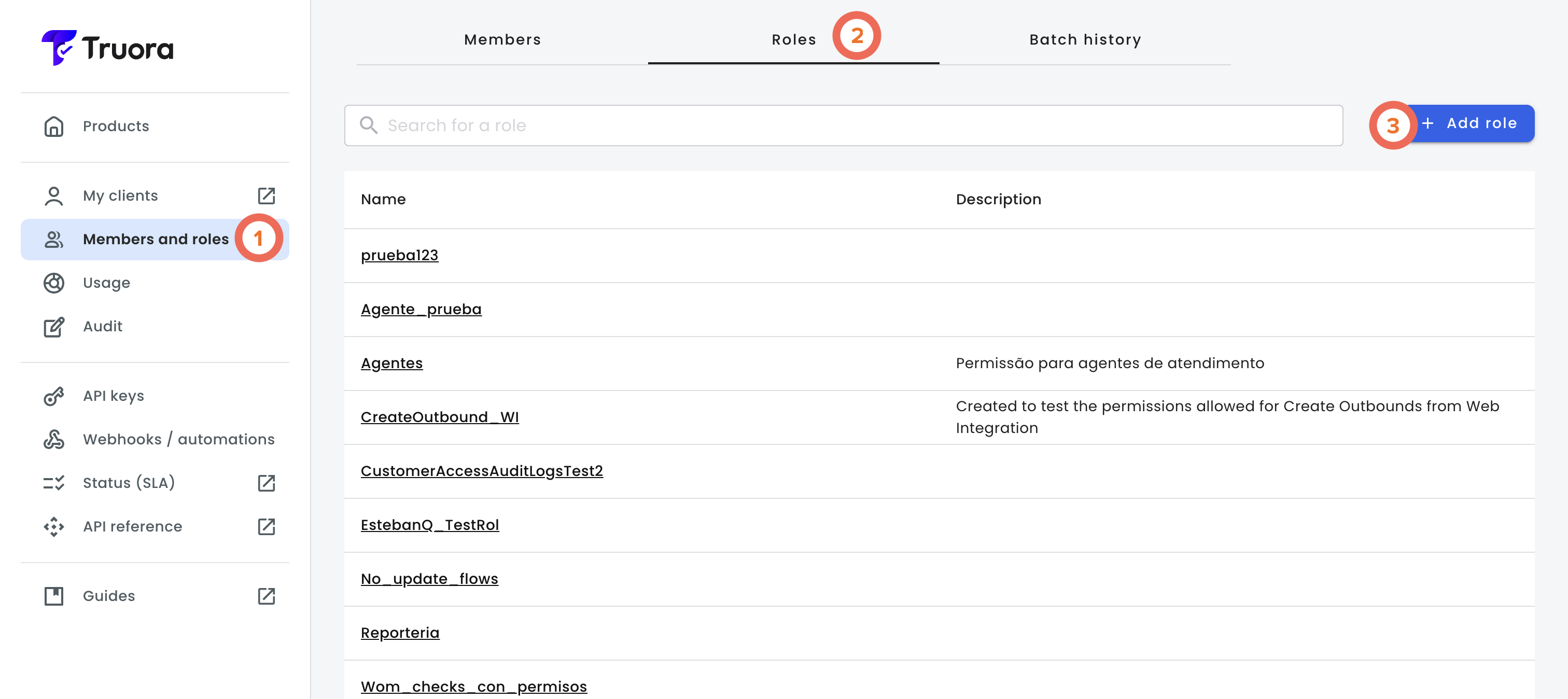
➕ Create a new role
Choose Add role. You can configure:
| Field | Details |
|---|---|
| Role name | How this role is labeled in the dashboard |
| Role description | Short note on what this role is for |
| Copy an existing role | Optionally start from another role’s permission set |
| Permissions by product | Which capabilities belong to this role (from Master Client Permissions) |
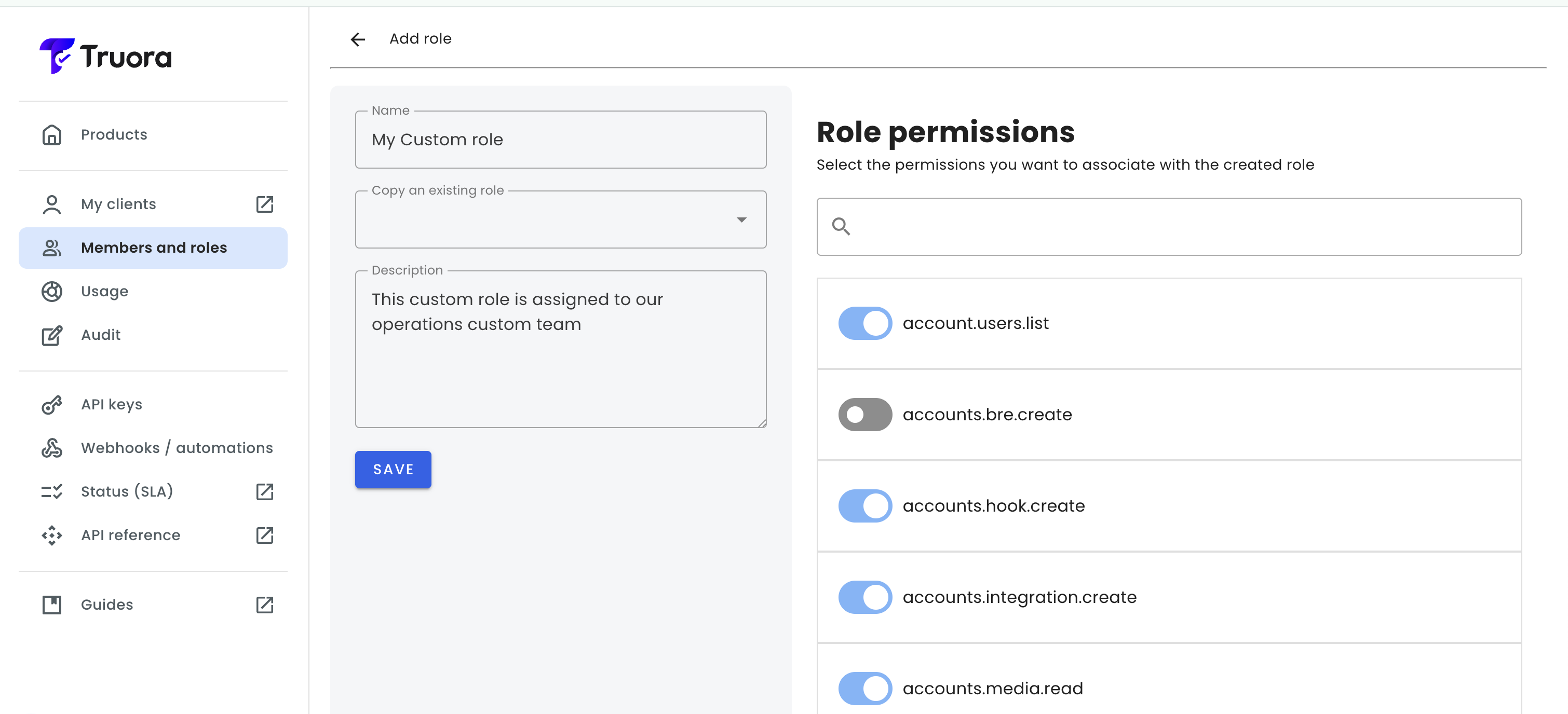
Configure permissions
Permissions are grouped by product. Open a product section to review the available permissions, then select the checkboxes for the capabilities the role should have.
Use Select all permissions to grant every available permission in that product.
Use the search field to filter permissions by label. Hover over a permission to view its description before selecting it.
⚙️ View or edit an existing role
Select a role in the list by clicking the name of the role. You can adjust its name, description, and permissions by product, as needed.
Remember: Each user has exactly one role assigned. One role can be assigned to many users.
📋 Available Permissions Reference
Below is a reference list of grant-style Truora permission strings (action and product-access permissions). Permissions that serve only as deny masks on specific fields in API outputs are not listed here — your Support team sets those when needed.
Actual permissions vary by contract: only strings present in your Master Client Permissions list can be assigned to roles.
The sections below follow the same product grouping shown in the dashboard.
Digital Identity
| Permission | Label | Description |
|---|---|---|
forms.create |
Create forms | Allows creating forms and viewing the utility lists available during configuration. |
forms.delete |
Delete forms | Allows deleting existing forms. |
forms.read |
View forms | Allows viewing forms, their responses, the associated utility lists and the previews of WhatsApp flows based on forms. |
forms.responses.create |
Create form responses | Allows creating responses for forms. |
forms.responses.read |
View form responses | Allows viewing and downloading responses submitted to forms. |
forms.update |
Edit forms | Allows updating existing forms and publishing them as WhatsApp flows. |
forms.utility_lists.create |
Create utility lists | Allows creating utility lists and adding items used as dynamic options in forms. |
forms.utility_lists.update |
Edit utility lists | Allows updating utility lists, their filters and their items. |
identity.customers.read |
View customer profiles in DI | Allows viewing customer profiles and the information associated with their identity processes. |
identity.flows.avoid_enter_authorization |
Skip authorization when entering verification | Allows defining that the flow does not require entry authorization. |
identity.flows.create |
Create digital identity flows | Allows creating new identity flows and saving their initial configuration. |
identity.flows.delete |
Delete digital identity flows | Allows deleting existing identity flows. |
identity.flows.read |
View digital identity flows | Allows viewing, listing and reviewing the configuration of identity flows. |
identity.flows.update |
Edit digital identity flows | Allows modifying, restoring and updating the configuration of existing identity flows. |
identity.geolocation.read |
View identity process geolocation | Allows viewing the geolocation information captured during the creation of identity processes. |
identity.pdf.read |
Download identity process PDF | Allows downloading the PDF report of an identity process. |
identity.processes.create |
Create digital identity processes | Allows creating new identity processes. |
identity.processes.delete |
Delete digital identity processes | Allows deleting identity processes. |
identity.processes.override.status |
Override identity process status | Allows manually changing the status of an identity process. |
identity.processes.read |
View identity processes | Allows viewing the status, result and general information of identity processes. |
identity.processes.read.own |
View own identity processes | Allows viewing only the identity processes created by the user or in which they participated directly. |
identity.processes.send_link |
Send identity process link | Allows generating and sending access links for identity processes. |
identity.processes.update |
Edit identity processes | Allows modifying identity processes and advancing or updating their verifications. |
identity.validations.read |
View identity process validations | Allows viewing the validations associated with an identity process. |
identity.variables.read |
View identity process variables | Allows viewing the decision variables extracted and calculated in identity processes. |
validations.account.read |
View validation accounts | Allows viewing the information of accounts created by validations. |
validations.cell_phone_validation_br |
Use cell phone validation in Brazil | Allows creating and viewing cell phone validations for Brazil. |
validations.cell_phone_validation_co |
Use cell phone validation in Colombia | Allows creating and viewing cell phone validations for Colombia. |
validations.cell_phone_validation_mx |
Use cell phone validation in Mexico | Allows creating and viewing cell phone validations for Mexico. |
validations.documents_validation_all |
Use document validation in all countries | Allows creating and viewing document validations for any supported country. |
validations.documents_validation_ar |
Use document validation in Argentina | Allows creating and viewing document validations for Argentina. |
validations.documents_validation_be |
Use document validation in Belgium | Allows creating and viewing document validations for Belgium. |
validations.documents_validation_bo |
Use document validation in Bolivia | Allows creating and viewing document validations for Bolivia. |
validations.documents_validation_br |
Use document validation in Brazil | Allows creating and viewing document validations for Brazil. |
validations.documents_validation_ca |
Use document validation in Canada | Allows creating and viewing document validations for Canada. |
validations.documents_validation_cl |
Use document validation in Chile | Allows creating and viewing document validations for Chile. |
validations.documents_validation_co |
Use document validation in Colombia | Allows creating and viewing document validations for Colombia. |
validations.documents_validation_cr |
Use document validation in Costa Rica | Allows creating and viewing document validations for Costa Rica. |
validations.documents_validation_de |
Use document validation in Germany | Allows creating and viewing document validations for Germany. |
validations.documents_validation_do |
Use document validation in Dominican Republic | Allows creating and viewing document validations for Dominican Republic. |
validations.documents_validation_ec |
Use document validation in Ecuador | Allows creating and viewing document validations for Ecuador. |
validations.documents_validation_es |
Use document validation in Spain | Allows creating and viewing document validations for Spain. |
validations.documents_validation_fr |
Use document validation in France | Allows creating and viewing document validations for France. |
validations.documents_validation_gb |
Use document validation in United Kingdom | Allows creating and viewing document validations for United Kingdom. |
validations.documents_validation_gt |
Use document validation in Guatemala | Allows creating and viewing document validations for Guatemala. |
validations.documents_validation_hn |
Use document validation in Honduras | Allows creating and viewing document validations for Honduras. |
validations.documents_validation_ie |
Use document validation in Ireland | Allows creating and viewing document validations for Ireland. |
validations.documents_validation_it |
Use document validation in Italy | Allows creating and viewing document validations for Italy. |
validations.documents_validation_mx |
Use document validation in Mexico | Allows creating and viewing document validations for Mexico. |
validations.documents_validation_pa |
Use document validation in Panama | Allows creating and viewing document validations for Panama. |
validations.documents_validation_pe |
Use document validation in Peru | Allows creating and viewing document validations for Peru. |
validations.documents_validation_sv |
Use document validation in El Salvador | Allows creating and viewing document validations for El Salvador. |
validations.documents_validation_us |
Use document validation in United States | Allows creating and viewing document validations for United States. |
validations.documents_validation_uy |
Use document validation in Uruguay | Allows creating and viewing document validations for Uruguay. |
validations.documents_validation_ve |
Use document validation in Venezuela | Allows creating and viewing document validations for Venezuela. |
validations.electronic_signature_validation |
Use electronic signature validation | Allows creating and viewing electronic signature validations. |
validations.email_validation |
Use email validation | Allows creating and viewing email validations. |
validations.enrollment.read |
View enrollments | Allows viewing the enrollments associated with validations. |
validations.enterprise_data |
Use enterprise data validation | Allows creating and viewing enterprise data validations. |
validations.face_recognition |
Use facial recognition validation | Allows creating and viewing facial recognition validations. |
validations.face_recognition.enrollments.create.direct |
Create direct facial enrollments | Allows creating facial recognition enrollments without prior confirmation. |
validations.face_recognition.enrollments.delete |
Delete facial enrollments | Allows deleting facial recognition enrollments. |
validations.face_search |
Use facial search validation | Allows creating and viewing facial search validations. |
validations.identity_questions |
Use identity questions validation | Allows creating and viewing identity questions validations. |
validations.labeling_analyst |
Work on labeling tasks | Allows requesting labeling tasks and viewing the project list as an analyst. |
validations.labeling_manager |
Manage labeling projects | Allows creating labeling projects, listing projects and requesting tasks as a manager. |
validations.manual_review |
Manage manual reviews | Allows managing manual reviews: assigning, updating, viewing counters and managing the status of reviewers. |
validations.validation.create |
Create validations | Allows creating new individual validations. |
validations.validation.delete |
Delete validations | Allows initiating validation deletion processes. |
validations.validation.read |
View validations | Allows viewing the status, result and detail of validations. |
validations.validation.update |
Update validations | Allows updating the information or status of existing validations. |
validations.voice_recognition |
Use voice recognition validation | Allows creating and viewing voice recognition validations. |
Background Checks
| Permission | Label | Description |
|---|---|---|
checks.attachments.read |
View check attachments | Allows viewing the attachments associated with a check. |
checks.behavior |
Use behavior checks | Allows running behavior validations in checks. |
checks.check.read |
View checks | Allows viewing checks and their results. |
checks.collectors.credentials.delete |
Delete collector credentials | Allows deleting the credentials configured for check collectors. |
checks.collectors.credentials.read |
View collector credentials | Allows viewing the credentials configured for check collectors. |
checks.collectors.credentials.upsert |
Create or update collector credentials | Allows creating or updating the credentials configured for check collectors. |
checks.country_all |
Create international checks | Allows creating checks for supported international countries. |
checks.country_ar |
Create checks in Argentina | Allows creating checks for Argentina. |
checks.country_bo |
Create checks in Bolivia | Allows creating checks for Bolivia. |
checks.country_br |
Create checks in Brazil | Allows creating checks for Brazil. |
checks.country_cl |
Create checks in Chile | Allows creating checks for Chile. |
checks.country_co |
Create checks in Colombia | Allows creating checks for Colombia. |
checks.country_co_premium |
Create premium checks in Colombia | Allows creating premium checks for Colombia. |
checks.country_cr |
Create checks in Costa Rica | Allows creating checks for Costa Rica. |
checks.country_ec |
Create checks in Ecuador | Allows creating checks for Ecuador. |
checks.country_mx |
Create checks in Mexico | Allows creating checks for Mexico. |
checks.country_pa |
Create checks in Panama | Allows creating checks for Panama. |
checks.country_pe |
Create checks in Peru | Allows creating checks for Peru. |
checks.details.read |
View check details | Allows viewing the full detail of a check. |
checks.pdf.read |
Download check PDF | Allows downloading the PDF report of a check. |
checks.variables.read |
View check variables | Allows viewing the decision variables associated with checks. |
Customer Engagement
| Permission | Label | Description |
|---|---|---|
connect.engagement.agent.capacity.manage |
Edit agent capacity | Allows modifying the agent capacity configuration. |
connect.engagement.agent.capacity.read |
View agent capacity | Allows viewing the agent capacity configuration. |
connect.engagement.catalogs.catalog_manage |
Manage catalogs | Allows creating, editing, deleting, and publishing catalogs. |
connect.engagement.catalogs.link |
Link catalogs with WhatsApp Business | Allows linking catalogs to a WhatsApp Business account. |
connect.engagement.catalogs.product_manage |
Manage catalog products | Allows creating, editing, and marking catalog products for deletion. |
connect.engagement.catalogs.read |
View catalogs | Allows viewing catalogs and products available for WhatsApp. |
connect.engagement.chat.exports.manage |
Create chat exports | Allows creating WhatsApp chat export requests. |
connect.engagement.chat.exports.read |
View chat exports | Allows viewing WhatsApp chat export requests. |
connect.whatsapp.agent_management.access |
View agent management | Allows opening the agent management view. |
connect.whatsapp.agent_management.groups_counters.read |
View agent group counters | Allows viewing group totals: online agents, open chats, and unassigned chats. |
connect.whatsapp.agents.access |
View WhatsApp agents | Allows opening the agent attention section in WhatsApp. |
connect.whatsapp.agents.conversations.all.read |
View all conversations | Allows viewing all WhatsApp conversations. |
connect.whatsapp.agents.conversations.all_closed.read |
View closed conversations | Allows viewing closed WhatsApp conversations. |
connect.whatsapp.agents.conversations.create |
Create agent conversations | Allows creating conversations for agent attention. |
connect.whatsapp.agents.conversations.labels.create |
Create conversation labels | Allows creating labels to categorize WhatsApp conversations. |
connect.whatsapp.agents.conversations.labels.delete |
Delete conversation labels | Allows deleting labels of WhatsApp conversations. |
connect.whatsapp.agents.conversations.labels.update |
Edit conversation labels | Allows modifying labels of WhatsApp conversations. |
connect.whatsapp.agents.conversations.own.read |
View own conversations | Allows viewing conversations assigned to the user. |
connect.whatsapp.agents.conversations.owner.all.update |
Edit any conversation owner | Allows changing the owner of any WhatsApp conversation. |
connect.whatsapp.agents.conversations.owner.own.update |
Edit own conversation owner | Allows taking unassigned conversations and reassigning own ones. |
connect.whatsapp.agents.conversations.owner.update |
Edit conversation owner | Allows changing the responsible agent for WhatsApp conversations. |
connect.whatsapp.agents.conversations.read |
View agent conversations | Allows viewing conversations handled by agents. |
connect.whatsapp.agents.conversations.unassigned.read |
View unassigned conversations | Allows viewing WhatsApp conversations that have no assigned agent. |
connect.whatsapp.agents.conversations.update |
Edit agent conversations | Allows modifying conversations handled by agents. |
connect.whatsapp.agents.groups.create |
Create agent groups | Allows creating WhatsApp agent groups. |
connect.whatsapp.agents.groups.delete |
Delete agent groups | Allows deleting WhatsApp agent groups. |
connect.whatsapp.agents.groups.read |
View agent groups | Allows viewing WhatsApp agent groups. |
connect.whatsapp.agents.groups.update |
Edit agent groups | Allows modifying WhatsApp agent groups. |
connect.whatsapp.agents.status.all.update |
Edit any agent status | Allows changing the status of any agent. |
connect.whatsapp.agents.status.own.update |
Edit own agent status | Allows the user to change their own status as an agent. |
connect.whatsapp.agents.templates.create |
Create agent message templates | Allows creating templates for WhatsApp agents. |
connect.whatsapp.agents.templates.delete |
Delete agent message templates | Allows deleting templates for WhatsApp agents. |
connect.whatsapp.agents.templates.read |
View agent message templates | Allows viewing templates used by WhatsApp agents. |
connect.whatsapp.agents.templates.update |
Edit agent message templates | Allows modifying templates for WhatsApp agents. |
connect.whatsapp.campaigns.create |
Create WhatsApp campaigns | Allows creating WhatsApp campaigns. |
connect.whatsapp.contacts.exports.create |
Create contacts exports | Allows exporting WhatsApp contacts to a CSV file. |
connect.whatsapp.contacts.exports.read |
View contacts exports | Allows listing contacts exports and downloading their files. |
connect.whatsapp.flows.access |
View WhatsApp flows | Allows entering the WhatsApp flows section. |
connect.whatsapp.flows_detail.access |
View WhatsApp flow details | Allows opening the detail of a WhatsApp flow. |
connect.whatsapp.flows_list.access |
View WhatsApp flows list | Allows viewing the list of WhatsApp flows. |
connect.whatsapp.history_reports.access |
View WhatsApp history reports | Allows opening the WhatsApp history reports section. |
connect.whatsapp.integrations.access |
View WhatsApp integrations | Allows opening the WhatsApp integrations section. |
connect.whatsapp.metrics.access |
View WhatsApp metrics | Allows viewing WhatsApp operation metrics. |
connect.whatsapp.settings.access |
View WhatsApp settings | Allows opening the WhatsApp settings section. |
connect.whatsapp.waba_line.manage |
Manage WhatsApp Business lines | Allows managing WhatsApp Business lines from the settings. |
identity.whatsapp.inbound_flows.create |
Create WhatsApp inbound flows | Allows creating inbound flows in WhatsApp. |
identity.whatsapp.inbound_flows.delete |
Delete WhatsApp inbound flows | Allows deleting inbound flows in WhatsApp. |
identity.whatsapp.inbound_flows.read |
View WhatsApp inbound flows | Allows viewing the inbound flows configured in WhatsApp. |
identity.whatsapp.inbound_flows.update |
Edit WhatsApp inbound flows | Allows editing inbound flows in WhatsApp. |
identity.whatsapp.outbound.create |
Create WhatsApp outbound messages | Allows creating outbound messages in WhatsApp. |
identity.whatsapp.outbound.delete |
Delete WhatsApp outbound messages | Allows deleting outbound messages in WhatsApp. |
identity.whatsapp.outbound.read |
View WhatsApp outbound messages | Allows viewing the outbound messages configured in WhatsApp. |
identity.whatsapp.outbound.send |
Send WhatsApp outbound messages | Allows executing an outbound transmission so that messages are sent to recipients. |
identity.whatsapp.outbound.update |
Edit WhatsApp outbound messages | Allows editing outbound messages in WhatsApp. |
identity.whatsapp.waba_lines.create |
Create WhatsApp Business lines | Allows creating WhatsApp Business lines. |
identity.whatsapp.waba_lines.delete |
Delete WhatsApp Business lines | Allows deleting WhatsApp Business lines. |
identity.whatsapp.waba_lines.read |
View WhatsApp Business lines | Allows viewing the WhatsApp Business lines configured. |
identity.whatsapp.waba_lines.update |
Edit WhatsApp Business lines | Allows modifying the configuration of WhatsApp Business lines. |
Account
| Permission | Label | Description |
|---|---|---|
account.users.list |
View members | Allows viewing the members associated with the account. |
accounts.bre.create |
Manage BRE rules | Allows creating and updating rules, actions and variables of the business rules engine (BRE). |
accounts.config.update |
Edit account settings | Allows modifying account settings. |
accounts.hook.create |
Manage webhooks | Allows creating and updating the account’s webhooks. |
accounts.iframe_domains.delete |
Delete iframe domains | Allows deleting the client’s allow-listed iframe domains. |
accounts.iframe_domains.list |
View iframe domains | Allows viewing the client’s allow-listed iframe domains. |
accounts.iframe_domains.write |
Configure iframe domains | Allows adding and updating the client’s allow-listed iframe domains. |
accounts.integration.create |
Manage integrations | Allows creating and updating integrations, their actions and credentials, and importing Postman collections. |
accounts.media.read |
View media files | Allows viewing the media files uploaded to the account. |
audit_logs.read |
View audit logs | Allows viewing the account’s audit events. |
client_media.request_upload |
Request media file upload | Allows making requests to upload media files to the account. |
consents.read |
View consents | Allows viewing the consents associated with the account. |
history_reports.create |
Generate histories | Allows requesting the generation of new CSV history exports in Checks, Digital Identity and WhatsApp. |
history_reports.read |
View generated histories | Allows viewing and downloading the history exports already generated in Checks, Digital Identity and WhatsApp. |
integrations.credentials.read_all |
View integration credentials | Allows viewing the credentials configured for the integrations. |
truora.keys |
Manage API keys | Allows creating, viewing, updating and deleting the account’s API keys. |
truora.roles |
Manage roles | Allows creating, viewing and updating the account’s custom roles. |
truora.users |
Manage members | Allows creating, updating, deactivating and deleting account users. |